Wednesday, November 14, 2012

Static VLAN, VLAN Trunking, VLAN VTP Modes


Initial switch configuration

Switch(config)#hostname ALS1
ALS1(config)#int vlan 1
ALS1(config-if)#ip add 10.1.1.103 255.255.255.0
ALS1(config-if)#no shut


Switch(config)#hostname ALS2
ALS2(config)#int vlan 1
ALS2(config-if)#ip add 10.1.1.104 255.255.255.0
ALS2(config-if)#no shut

Switch(config)#hostname DLS1

 DLS1(config)#int vlan 1
 DLS1(config-if)#ip add 10.1.1.101 255.255.255.0
 DLS1(config-if)#no shut


Switch(config)#hostname DLS2
DLS2(config)#int vlan 1
DLS2(config-if)#ip add 10.1.1.102 255.255.255.0
DLS2(config-if)#no shut


I will configure DLS1 as a vtp server and ALS1 as a VTP client using vtp domain SWLAB


DLS1#
DLS1#show vtp status
VTP Version                     : 2
Configuration Revision          : 0
Maximum VLANs supported locally : 1005
Number of existing VLANs        : 5
VTP Operating Mode              : Server
VTP Domain Name                 :
VTP Pruning Mode                : Disabled
VTP V2 Mode                     : Disabled
VTP Traps Generation            : Disabled
MD5 digest                      : 0x7D 0x5A 0xA6 0x0E 0x9A 0x72 0xA0 0x3A
Configuration last modified by 0.0.0.0 at 0-0-00 00:00:00
Local updater ID is 10.1.1.101 on interface Vl1 (lowest numbered VLAN interface found)
DLS1#config t
Enter configuration commands, one per line.  End with CNTL/Z.
DLS1(config)#vtp domain SWLAB
Changing VTP domain name from NULL to SWLAB
DLS1(config)#do show vtp status
VTP Version                     : 2
Configuration Revision          : 0
Maximum VLANs supported locally : 1005
Number of existing VLANs        : 5
VTP Operating Mode              : Server
VTP Domain Name                 : SWLAB
VTP Pruning Mode                : Disabled
VTP V2 Mode                     : Disabled
VTP Traps Generation            : Disabled
MD5 digest                      : 0x87 0x67 0x56 0x26 0xCB 0xE7 0x65 0x4D
Configuration last modified by 0.0.0.0 at 0-0-00 00:00:00
Local updater ID is 10.1.1.101 on interface Vl1 (lowest numbered VLAN interface found)


ALS1#show vtp status
VTP Version                     : 2
Configuration Revision          : 0
Maximum VLANs supported locally : 255
Number of existing VLANs        : 5
VTP Operating Mode              : Server
VTP Domain Name                 :
VTP Pruning Mode                : Disabled
VTP V2 Mode                     : Disabled
VTP Traps Generation            : Disabled
MD5 digest                      : 0x7D 0x5A 0xA6 0x0E 0x9A 0x72 0xA0 0x3A
Configuration last modified by 0.0.0.0 at 0-0-00 00:00:00
Local updater ID is 10.1.1.103 on interface Vl1 (lowest numbered VLAN interface found)
ALS1#config t
Enter configuration commands, one per line.  End with CNTL/Z.
ALS1(config)#vtp mode client
Setting device to VTP CLIENT mode.
ALS1(config)#vtp domain SWLAB
Changing VTP domain name from NULL to SWLAB
ALS1(config)#do show vtp status
VTP Version                     : 2
Configuration Revision          : 0
Maximum VLANs supported locally : 255
Number of existing VLANs        : 5
VTP Operating Mode              : Client
VTP Domain Name                 : SWLAB
VTP Pruning Mode                : Disabled
VTP V2 Mode                     : Disabled
VTP Traps Generation            : Disabled
MD5 digest                      : 0x87 0x67 0x56 0x26 0xCB 0xE7 0x65 0x4D
Configuration last modified by 0.0.0.0 at 0-0-00 00:00:00

The configuration hasn't been modified because there are no trunks setup between these two switches, if I hadn't given the ALS1 the domain name it wouldn't have gotten it automatically because no trunks exist.


ALS1#show interfaces trunk

ALS1#show interfaces fastEthernet 0/7 switchport
Name: Fa0/7
Switchport: Enabled
Administrative Mode: dynamic auto
Operational Mode: static access
Administrative Trunking Encapsulation: dot1q
Operational Trunking Encapsulation: native
Negotiation of Trunking: On
Access Mode VLAN: 1 (default)
Trunking Native Mode VLAN: 1 (default)
Voice VLAN: none
Administrative private-vlan host-association: none
Administrative private-vlan mapping: none
Administrative private-vlan trunk native VLAN: none
Administrative private-vlan trunk encapsulation: dot1q
Administrative private-vlan trunk normal VLANs: none
Administrative private-vlan trunk private VLANs: none
Operational private-vlan: none
Trunking VLANs Enabled: ALL
Pruning VLANs Enabled: 2-1001
Capture Mode Disabled
Capture VLANs Allowed: ALL
Protected: false
Appliance trust: none


DLS1#show interfaces fastEthernet 0/7 switchport 
Name: Fa0/7
Switchport: Enabled
Administrative Mode: dynamic auto
Operational Mode: static access
Administrative Trunking Encapsulation: dot1q
Operational Trunking Encapsulation: native
Negotiation of Trunking: On
Access Mode VLAN: 1 (default)
Trunking Native Mode VLAN: 1 (default)
Voice VLAN: none
Administrative private-vlan host-association: none
Administrative private-vlan mapping: none
Administrative private-vlan trunk native VLAN: none
Administrative private-vlan trunk encapsulation: dot1q
Administrative private-vlan trunk normal VLANs: none
Administrative private-vlan trunk private VLANs: none
Operational private-vlan: none
Trunking VLANs Enabled: All
Pruning VLANs Enabled: 2-1001
Capture Mode Disabled
Capture VLANs Allowed: ALL
Protected: false
Unknown unicast blocked: disabled
Unknown multicast blocked: disabled
Appliance trust: none

Trunks will not form because port 7 on both switches are setup for dynamic auto, both are listening for instructions to become a trunk. I will setup DLS1's port 7 in trunk mode for all ports that will be used as trunks.


DLS1(config)#int range fastEthernet 0/7-12
DLS1(config-if-range)#switchport trunk encapsulation dot1q
DLS1(config-if-range)#switchport mode trunk

DLS1#show interfaces trunk
Port        Mode         Encapsulation  Status        Native vlan
Fa0/7       on           802.1q         trunking      1
Fa0/8       on           802.1q         trunking      1
Fa0/9       on           802.1q         trunking      1
Fa0/10      on           802.1q         trunking      1
Fa0/11      on           802.1q         trunking      1
Fa0/12      on           802.1q         trunking      1

ALS1(config)#int range fastEthernet 0/7-12
ALS1(config-if-range)#switchport mode trunk

Client ports will be setup as access switches because they do not need to participate in spanning tree.


DLS2(config)#int range fastEthernet 0/7-12
DLS2(config-if-range)#switchport trunk encapsulation dot1q
DLS2(config-if-range)#switchport mode trunk


ALS2(config)#int fa0/6
ALS2(config-if)#switchport mode access 


DLS1(config)#int fa0/6
DLS1(config-if)#switchport mode access


ALS1(config)#int fa0/6
ALS1(config-if)#switchport mode access


I created the VLANs on the VTP server which will propagate them to clients and other servers within the domain.

DLS1#config t
DLS1(config)#vlan 100
DLS1(config-vlan)#vlan 110
DLS1(config-vlan)#vlan 120


Now I can assign the ports to their respective VLANs.

DLS1(config)#int fa0/6
DLS1(config-if)#switchport access vlan 100

Client can't not speak with each other because they are in different VLANs without layer 3 routing.

Tuesday, November 6, 2012

Manually Configure Spanning-Tree Root


In this lab, I created two trunk ports on each switch and let spanning-tree run it's default election process.

Sw1(config)#int fa0/11
Sw1(config-if)#switchport trunk encap dot
Sw1(config-if)#switchport mode trunk

%LINEPROTO-5-UPDOWN: Line protocol on Interface FastEthernet0/11, changed state to down

%LINEPROTO-5-UPDOWN: Line protocol on Interface FastEthernet0/11, changed state to up

Sw1(config-if)#int fa0/12
Sw1(config-if)#switchport trunk encap dot
Sw1(config-if)#switchport mode trunk

%LINEPROTO-5-UPDOWN: Line protocol on Interface FastEthernet0/12, changed state to down

%LINEPROTO-5-UPDOWN: Line protocol on Interface FastEthernet0/12, changed state to up

Sw2(config)#int fa0/11
Sw2(config-if)#switchport trunk encap dot
Sw2(config-if)#switchport mode trunk
Sw2(config-if)#int fa0/12
Sw2(config-if)#switchport trunk encap dot
Sw2(config-if)#switchport mode trunk

Running the show spanning-tree command by itself will display all spanning tree information for each vlan. There are 4 vlan on each switch, vlan 1,10,20 and 30. Sw1 won the election and is the root switch for all vlans. There are multiple ways of verifying if the switch is the root switch, one is that the show spanning tree command will display "this is the root bridge", the root id information will match the bridge id information and lastly, all ports will be forwarding state.

Sw1#show spanning-tree 
VLAN0001
  Spanning tree enabled protocol ieee
  Root ID    Priority    32769
             Address     0002.1710.2A57
             This bridge is the root
             Hello Time  2 sec  Max Age 20 sec  Forward Delay 15 sec

  Bridge ID  Priority    32769  (priority 32768 sys-id-ext 1)
             Address     0002.1710.2A57
             Hello Time  2 sec  Max Age 20 sec  Forward Delay 15 sec
             Aging Time  20

Interface        Role Sts Cost      Prio.Nbr Type
---------------- ---- --- --------- -------- --------------------------------
Fa0/11           Desg FWD 19        128.11   P2p
Fa0/12           Desg FWD 19        128.12   P2p

VLAN0010
  Spanning tree enabled protocol ieee
  Root ID    Priority    32778
             Address     0002.1710.2A57
             This bridge is the root
             Hello Time  2 sec  Max Age 20 sec  Forward Delay 15 sec

  Bridge ID  Priority    32778  (priority 32768 sys-id-ext 10)
             Address     0002.1710.2A57
             Hello Time  2 sec  Max Age 20 sec  Forward Delay 15 sec
             Aging Time  20

Interface        Role Sts Cost      Prio.Nbr Type
---------------- ---- --- --------- -------- --------------------------------
Fa0/11           Desg FWD 19        128.11   P2p
Fa0/12           Desg FWD 19        128.12   P2p

VLAN0020
  Spanning tree enabled protocol ieee
  Root ID    Priority    32788
             Address     0002.1710.2A57
             This bridge is the root
             Hello Time  2 sec  Max Age 20 sec  Forward Delay 15 sec

  Bridge ID  Priority    32788  (priority 32768 sys-id-ext 20)
             Address     0002.1710.2A57
             Hello Time  2 sec  Max Age 20 sec  Forward Delay 15 sec
             Aging Time  20

Interface        Role Sts Cost      Prio.Nbr Type
---------------- ---- --- --------- -------- --------------------------------
Fa0/11           Desg FWD 19        128.11   P2p
Fa0/12           Desg FWD 19        128.12   P2p

VLAN0030
  Spanning tree enabled protocol ieee
  Root ID    Priority    32798
             Address     0002.1710.2A57
             This bridge is the root
             Hello Time  2 sec  Max Age 20 sec  Forward Delay 15 sec

  Bridge ID  Priority    32798  (priority 32768 sys-id-ext 30)
             Address     0002.1710.2A57
             Hello Time  2 sec  Max Age 20 sec  Forward Delay 15 sec
             Aging Time  20

Interface        Role Sts Cost      Prio.Nbr Type
---------------- ---- --- --------- -------- --------------------------------
Fa0/11           Desg FWD 19        128.11   P2p
Fa0/12           Desg FWD 19        128.12   P2p


On Sw2 I displayed the information for vlan 30 only, here we don't see "this is the root bridge", the root information doesn't match the bridge ID and not all ports are forwarding 

Sw2# show spanning-tree vlan 30
VLAN0030
  Spanning tree enabled protocol ieee
  Root ID    Priority    32798
             Address     0002.1710.2A57
             Cost        19
             Port        11(FastEthernet0/11)
             Hello Time  2 sec  Max Age 20 sec  Forward Delay 15 sec

  Bridge ID  Priority    32798  (priority 32768 sys-id-ext 30)
             Address     000C.CF68.DC11
             Hello Time  2 sec  Max Age 20 sec  Forward Delay 15 sec
             Aging Time  20

Interface        Role Sts Cost      Prio.Nbr Type
---------------- ---- --- --------- -------- --------------------------------
Fa0/11           Root FWD 19        128.11   P2p
Fa0/12           Altn BLK 19        128.12   P2p

I want to manually change the SPF root for vlan 20 and 30 to Sw2. I used the spanning-tree vlan root primary command. There is a option for a secondary root if I wanted to create a backup root.

Sw2(config)#spanning-tree vlan 20 root primary 
Sw2(config)#spanning-tree vlan 30 root primary 

I can see now that Sw2 is the root switch for vlan 20 and vlan 30.

Sw2#show span vlan 20
VLAN0020
  Spanning tree enabled protocol ieee
  Root ID    Priority    24596
             Address     000C.CF68.DC11
             This bridge is the root
             Hello Time  2 sec  Max Age 20 sec  Forward Delay 15 sec

  Bridge ID  Priority    24596  (priority 24576 sys-id-ext 20)
             Address     000C.CF68.DC11
             Hello Time  2 sec  Max Age 20 sec  Forward Delay 15 sec
             Aging Time  20

Interface        Role Sts Cost      Prio.Nbr Type
---------------- ---- --- --------- -------- --------------------------------
Fa0/11           Desg FWD 19        128.11   P2p
Fa0/12           Desg LRN 19        128.12   P2p

Sw2#show span vlan 30
VLAN0030
  Spanning tree enabled protocol ieee
  Root ID    Priority    24606
             Address     000C.CF68.DC11
             This bridge is the root
             Hello Time  2 sec  Max Age 20 sec  Forward Delay 15 sec

  Bridge ID  Priority    24606  (priority 24576 sys-id-ext 30)
             Address     000C.CF68.DC11
             Hello Time  2 sec  Max Age 20 sec  Forward Delay 15 sec
             Aging Time  20

Interface        Role Sts Cost      Prio.Nbr Type
---------------- ---- --- --------- -------- --------------------------------
Fa0/11           Desg FWD 19        128.11   P2p
Fa0/12           Desg LRN 19        128.12   P2p


Sw2#show span vlan 30
VLAN0030
  Spanning tree enabled protocol ieee
  Root ID    Priority    24606
             Address     000C.CF68.DC11
             This bridge is the root
             Hello Time  2 sec  Max Age 20 sec  Forward Delay 15 sec

  Bridge ID  Priority    24606  (priority 24576 sys-id-ext 30)
             Address     000C.CF68.DC11
             Hello Time  2 sec  Max Age 20 sec  Forward Delay 15 sec
             Aging Time  20

Interface        Role Sts Cost      Prio.Nbr Type
---------------- ---- --- --------- -------- --------------------------------
Fa0/11           Desg FWD 19        128.11   P2p
Fa0/12           Desg FWD 19        128.12   P2p


Passed CCNP Route

I will start studying material for the Switch Exam.

BGP Route Reflectors


R1#show ip bgp
BGP table version is 3, local router ID is 1.1.1.1
Status codes: s suppressed, d damped, h history, * valid, > best, i - internal,
              r RIB-failure, S Stale
Origin codes: i - IGP, e - EGP, ? - incomplete

   Network          Next Hop            Metric LocPrf Weight Path
*>i2.2.2.2/32       172.12.123.2             0    100      0 i
*>i4.4.4.4/32       172.12.123.3             0    100      0 4 i


R2#show ip bgp
BGP table version is 2, local router ID is 2.2.2.2
Status codes: s suppressed, d damped, h history, * valid, > best, i - internal,
              r RIB-failure, S Stale
Origin codes: i - IGP, e - EGP, ? - incomplete

   Network          Next Hop            Metric LocPrf Weight Path
*> 2.2.2.2/32       0.0.0.0                  0         32768 i


R3#show ip bgp
BGP table version is 2, local router ID is 3.3.3.3
Status codes: s suppressed, d damped, h history, * valid, > best, i - internal,
              r RIB-failure, S Stale
Origin codes: i - IGP, e - EGP, ? - incomplete

   Network          Next Hop            Metric LocPrf Weight Path
*> 4.4.4.4/32       10.1.1.4                 0             0 4 i


R1(config)#router bgp 1235
R1(config-router)#nei
R1(config-router)#neighbor 172.12.123.2 rou
R1(config-router)#neighbor 172.12.123.2 route-re
R1(config-router)#neighbor 172.12.123.2 route-reflector-client
*Mar  1 00:22:49.735: %BGP-5-ADJCHANGE: neighbor 172.12.123.2 Down RR client conf*Mar  1 00:22:52.071: %BGP-5-ADJCHANGE: neighbor 172.12.123.2 Up

R1(config-router)#neighbor 172.12.123.3 route-reflector-client
R1(config-router)#
*Mar  1 00:23:11.183: %BGP-5-ADJCHANGE: neighbor 172.12.123.3 Down RR client config change
*Mar  1 00:23:13.487: %BGP-5-ADJCHANGE: neighbor 172.12.123.3 Up

R2#
*Mar  1 00:22:48.887: %BGP-5-ADJCHANGE: neighbor 172.12.123.1 Down Peer closed the session
*Mar  1 00:22:50.867: %BGP-5-ADJCHANGE: neighbor 172.12.123.1 Up
R2#show ip bgp
BGP table version is 5, local router ID is 2.2.2.2
Status codes: s suppressed, d damped, h history, * valid, > best, i - internal,
              r RIB-failure, S Stale
Origin codes: i - IGP, e - EGP, ? - incomplete

   Network          Next Hop            Metric LocPrf Weight Path
*> 2.2.2.2/32       0.0.0.0                  0         32768 i
*>i4.4.4.4/32       172.12.123.3             0    100      0 4 i

R3#
*Mar  1 00:23:08.943: %BGP-5-ADJCHANGE: neighbor 172.12.123.1 Down Peer closed the session
*Mar  1 00:23:11.019: %BGP-5-ADJCHANGE: neighbor 172.12.123.1 Up

R3#show ip bgp
BGP table version is 5, local router ID is 3.3.3.3
Status codes: s suppressed, d damped, h history, * valid, > best, i - internal,
              r RIB-failure, S Stale
Origin codes: i - IGP, e - EGP, ? - incomplete

   Network          Next Hop            Metric LocPrf Weight Path
*>i2.2.2.2/32       172.12.123.2             0    100      0 i
*> 4.4.4.4/32       10.1.1.4                 0             0 4 i

Distribute List OSPF


R1#show ip rou
R1#show ip route rip
R    5.0.0.0/8 [120/1] via 15.1.1.5, 00:00:15, FastEthernet0/0
R    6.0.0.0/8 [120/1] via 15.1.1.5, 00:00:15, FastEthernet0/0
R    7.0.0.0/8 [120/1] via 15.1.1.5, 00:00:15, FastEthernet0/0
R    8.0.0.0/8 [120/1] via 15.1.1.5, 00:00:15, FastEthernet0/0

R1(config)#router ospf 1
R1(config-router)#redistribute rip subnets 
R1(config-router)#redistribute connected subnets 

R2#show ip route ospf 
     1.0.0.0/32 is subnetted, 1 subnets
O E2    1.1.1.1 [110/20] via 172.12.123.1, 00:00:10, Serial0/0
O E2 5.0.0.0/8 [110/20] via 172.12.123.1, 00:00:15, Serial0/0
O E2 6.0.0.0/8 [110/20] via 172.12.123.1, 00:00:15, Serial0/0
O E2 7.0.0.0/8 [110/20] via 172.12.123.1, 00:00:15, Serial0/0
O E2 8.0.0.0/8 [110/20] via 172.12.123.1, 00:00:15, Serial0/0
     15.0.0.0/24 is subnetted, 1 subnets
O E2    15.1.1.0 [110/20] via 172.12.123.1, 00:00:15, Serial0/0
R2#

R1(config)#access-list 17 deny 6.0.0.0 0.255.255.255
R1(config)#access-list 17 deny 7.0.0.0 0.255.255.255
R1(config)#access-list 17 permit any                
R1(config)#router ospf 1
R1(config-router)#distribute-list 17 out rip 
R1(config-router)#

R2#show ip route ospf                                             
     1.0.0.0/32 is subnetted, 1 subnets
O E2    1.1.1.1 [110/20] via 172.12.123.1, 00:04:25, Serial0/0
O E2 5.0.0.0/8 [110/20] via 172.12.123.1, 00:04:30, Serial0/0
O E2 8.0.0.0/8 [110/20] via 172.12.123.1, 00:04:30, Serial0/0
     15.0.0.0/24 is subnetted, 1 subnets
O E2    15.1.1.0 [110/20] via 172.12.123.1, 00:04:30, Serial0/0


Sunday, October 28, 2012

BGP Route Aggregation


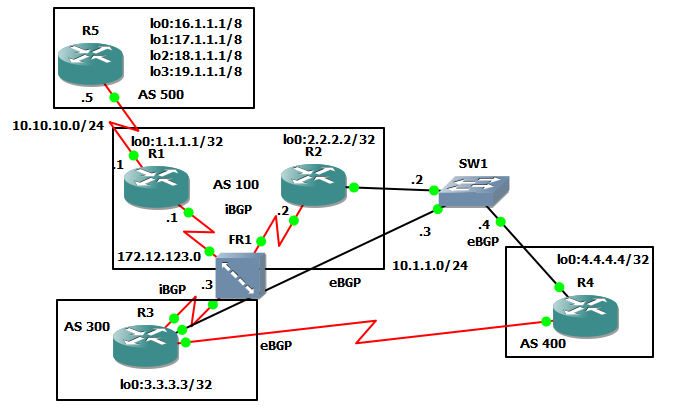
In this lab, I want to summarize the routes being advised by R5, in BGP it's called route aggregation. I found the summary route the same by writing down all the routes in binary and finding the common bits to make the network address and turning those to all ones to get the subnet mask.

0001 0000    00000001    00000001    00000001    00000001
0001 0001    00000001    00000001    00000001    00000001
0001 0010    00000001    00000001    00000001    00000001
0001 0100    00000001    00000001    00000001    00000001

common bits
0001 0 = 16.0.0.0

Turn common bits to all ones
11111 = 252.0.0.0

16.0.0.0 252.0.0.0 is the aggregate address and mask

I want to reduce the size of R1's BGP table because everything has a cost in CPU cycles. I will create the aggregation on R2.


R1#show ip bgp
BGP table version is 5, local router ID is 1.1.1.1
Status codes: s suppressed, d damped, h history, * valid, > best, i - internal,
              r RIB-failure, S Stale
Origin codes: i - IGP, e - EGP, ? - incomplete

   Network          Next Hop            Metric LocPrf Weight Path
*> 16.0.0.0         10.10.10.5               0             0 500 i
*> 17.0.0.0         10.10.10.5               0             0 500 i
*> 18.0.0.0         10.10.10.5               0             0 500 i
*> 19.0.0.0         10.10.10.5               0             0 500 i


R1#show ip bgp sum
BGP router identifier 1.1.1.1, local AS number 100
BGP table version is 5, main routing table version 5
4 network entries using 480 bytes of memory
4 path entries using 208 bytes of memory
2/1 BGP path/bestpath attribute entries using 248 bytes of memory
1 BGP AS-PATH entries using 24 bytes of memory
0 BGP route-map cache entries using 0 bytes of memory
0 BGP filter-list cache entries using 0 bytes of memory
BGP using 960 total bytes of memory
BGP activity 4/0 prefixes, 4/0 paths, scan interval 60 secs

Neighbor        V    AS MsgRcvd MsgSent   TblVer  InQ OutQ Up/Down  State/PfxRcd
10.10.10.5      4   500       5       4        5    0    0 00:00:39        4


R5#config t
Enter configuration commands, one per line.  End with CNTL/Z.
R5(config)#router bgp 500
R5(config-router)#aggregate-address 16.0.0.0 252.0.0.0

BGP by default aggregate addresses along with the more specific routes, when I look at the BGP routes, I'm now learning 5 routes, each single route with the additional of the summary route.


R1#show ip bgp sum
BGP router identifier 1.1.1.1, local AS number 100
BGP table version is 6, main routing table version 6
5 network entries using 600 bytes of memory
5 path entries using 260 bytes of memory
3/2 BGP path/bestpath attribute entries using 372 bytes of memory
1 BGP AS-PATH entries using 24 bytes of memory
0 BGP route-map cache entries using 0 bytes of memory
0 BGP filter-list cache entries using 0 bytes of memory
BGP using 1256 total bytes of memory
BGP activity 5/0 prefixes, 5/0 paths, scan interval 60 secs

Neighbor        V    AS MsgRcvd MsgSent   TblVer  InQ OutQ Up/Down  State/PfxRcd
10.10.10.5      4   500       8       6        6    0    0 00:02:12        5

Summary is in bold below

R1#show ip bgp
BGP table version is 6, local router ID is 1.1.1.1
Status codes: s suppressed, d damped, h history, * valid, > best, i - internal,
              r RIB-failure, S Stale
Origin codes: i - IGP, e - EGP, ? - incomplete

   Network          Next Hop            Metric LocPrf Weight Path
*> 16.0.0.0         10.10.10.5               0             0 500 i
*> 16.0.0.0/6       10.10.10.5               0             0 500 i
*> 17.0.0.0         10.10.10.5               0             0 500 i
*> 18.0.0.0         10.10.10.5               0             0 500 i
*> 19.0.0.0         10.10.10.5               0             0 500 i

I will take off the default and enable the option for summary only.
R5(config)#router bgp 500
R5(config-router)#no aggregate-address 16.0.0.0 252.0.0.0
R5(config-router)#aggregate-address 16.0.0.0 252.0.0.0 summary-only

I now have only an aggregate address being advised to R1.

R1#show ip bgp
BGP table version is 12, local router ID is 1.1.1.1
Status codes: s suppressed, d damped, h history, * valid, > best, i - internal,
              r RIB-failure, S Stale
Origin codes: i - IGP, e - EGP, ? - incomplete

   Network          Next Hop            Metric LocPrf Weight Path
*> 16.0.0.0/6       10.10.10.5               0             0 500 i

I notice the atomic-aggregate attribute in the BGP summary.
R1#show ip bgp 16.0.0.0
BGP routing table entry for 16.0.0.0/6, version 8
Paths: (1 available, best #1, table Default-IP-Routing-Table)
Flag: 0x820
  Not advertised to any peer
  500, (aggregated by 500 19.1.1.1)
    10.10.10.5 from 10.10.10.5 (19.1.1.1)
      Origin IGP, metric 0, localpref 100, valid, external, atomic-aggregate, best


BGP-Changing weight attribute (cisco specific)


In this lab I will demonstrate how to change the weight of a neighbor peer to get the results I want. R4 is advertising its lo 4.4.4.4 and R1 know how to get it two different ways, R2 and R3. I want R1 to choose R3.

No routes are chosen as best because both are inaccessible.

R1#show ip bgp
BGP table version is 1, local router ID is 1.1.1.1
Status codes: s suppressed, d damped, h history, * valid, > best, i - internal,
              r RIB-failure, S Stale
Origin codes: i - IGP, e - EGP, ? - incomplete

   Network          Next Hop            Metric LocPrf Weight Path
* i4.4.4.4/32       10.1.1.4                 0    100      0 4 i
* i                 10.1.1.4                 0    100      0 4 i

First I notice that I need the next-hop-self command on R2 and R3 because in BGP the next hop router doesn't change when advising into an different AS.

R2(config-router)#neighbor 172.12.123.1 next-hop-self

R3(config-router)#neighbor 172.12.123.1 next-hop-self

R1#show ip bgp
BGP table version is 2, local router ID is 1.1.1.1
Status codes: s suppressed, d damped, h history, * valid, > best, i - internal,
              r RIB-failure, S Stale
Origin codes: i - IGP, e - EGP, ? - incomplete

   Network          Next Hop            Metric LocPrf Weight Path
* i4.4.4.4/32       172.12.123.3             0    100      0 4 i
*>i                 172.12.123.2             0    100      0 4 i

I need to clear the BGP table so that I can force the changes to appear.

R1#show ip bgp 4.4.4.4
BGP routing table entry for 4.4.4.4/32, version 2
Paths: (2 available, best #2, table Default-IP-Routing-Table)
Flag: 0x820
  Not advertised to any peer
  4
    172.12.123.3 from 172.12.123.3 (3.3.3.3)
      Origin IGP, metric 0, localpref 100, valid, internal
  4
    172.12.123.2 from 172.12.123.2 (2.2.2.2)
      Origin IGP, metric 0, localpref 100, valid, internal, best

Now that both routes accessible, I will change the weight with the neighbor weight command.

R1(config)#router bgp 123
R1(config-router)#neighbor 172.12.123.3 weight 200

R1#show ip bgp
BGP table version is 2, local router ID is 1.1.1.1
Status codes: s suppressed, d damped, h history, * valid, > best, i - internal,
              r RIB-failure, S Stale
Origin codes: i - IGP, e - EGP, ? - incomplete

   Network          Next Hop            Metric LocPrf Weight Path
* i4.4.4.4/32       172.12.123.3             0    100      0 4 i
*>i                 172.12.123.2             0    100      0 4 i
R1#clear ip bgp * soft

R1#show ip bgp
BGP table version is 3, local router ID is 1.1.1.1
Status codes: s suppressed, d damped, h history, * valid, > best, i - internal,
              r RIB-failure, S Stale
Origin codes: i - IGP, e - EGP, ? - incomplete

   Network          Next Hop            Metric LocPrf Weight Path
*>i4.4.4.4/32       172.12.123.3             0    100    200 4 i
* i                 172.12.123.2             0    100      0 4 i

The weight now shows 200 for R3's route.